AI Tool
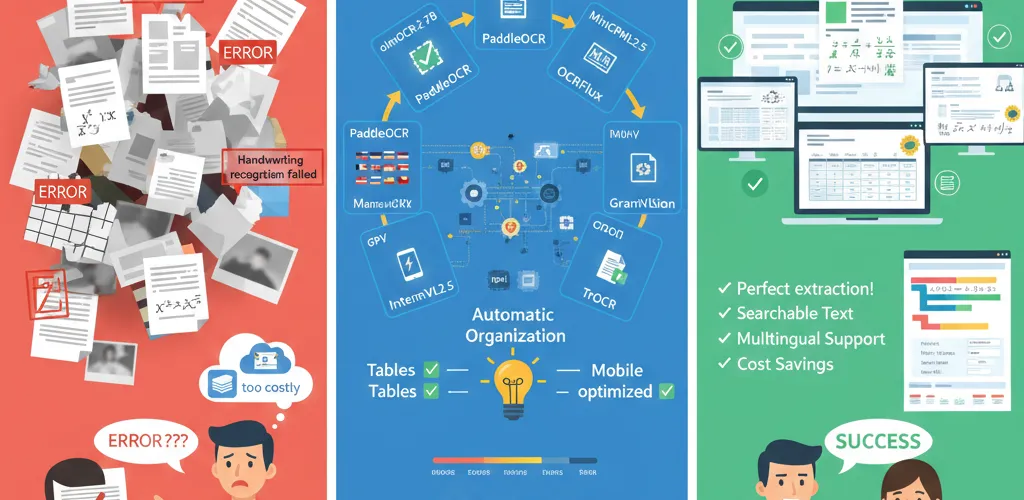
Turn your documents into accurate digital copies with these open source OCR models. Instead of fighting messy text extraction, you get clean markdown from PDFs, images, and scanned documents.
What modern OCR models do
Beyond basic text extraction
These models do more than read text. They recognize document structure, tables, diagrams, math equations, and multiple languages, and turn all of it into well-formatted markdown.
Local processing
Run these models on your own machine without sending sensitive documents to cloud services. You keep control over your data and get accuracy close to enterprise services.
olmOCR-2-7B-1025
High-performance document OCR
Allen Institute’s flagship OCR model. It is fine-tuned from Qwen2.5-VL-7B-Instruct using GRPO reinforcement learning and scores 82.4 on the olmOCR-bench evaluation.
from transformers import AutoTokenizer, AutoModelForCausalLMimport torch
# Load the modelmodel_id = "allenai/olmOCR-2-7B-1025"tokenizer = AutoTokenizer.from_pretrained(model_id)model = AutoModelForCausalLM.from_pretrained(model_id, torch_dtype=torch.bfloat16, device_map="auto")
# Process documentmessages = [ {"role": "user", "content": "Convert this document to markdown"}, {"role": "user", "content": f"[IMAGE_PLACEHOLDER]"}]
inputs = tokenizer.apply_chat_template(messages, return_tensors="pt").to(model.device)outputs = model.generate(inputs, max_new_tokens=4096)result = tokenizer.decode(outputs[0], skip_special_tokens=True)Key features
- Mathematical equations: Handles complex math expressions
- Table recognition: Keeps table structure and formatting intact
- Layout understanding: Manages multi-column documents and complex layouts
- Large-scale processing: Built for processing millions of documents
- Automated retries: Includes error handling and automatic rotation correction
PaddleOCR VL
Efficient multilingual OCR
An ultra-compact vision-language model. It integrates the NaViT visual encoder with the ERNIE language model and supports 109 languages with minimal resource usage.
import paddlefrom paddlenlp import Taskflow
# Initialize OCR pipelineocr = Taskflow("document_parsing")
# Process documentresult = ocr({"doc": "path/to/document.pdf"})print(result)Key features
- 109 languages: Chinese, English, Japanese, Arabic, Hindi, Thai
- Complex elements: Tables, formulas, charts recognition
- High accuracy: Strong performance on OmniDocBench
- Fast inference: Optimized for real-world deployment
- Compact size: Efficient use of memory and compute
OCRFlux-3B
Multimodal document conversion
A preview release from ChatDOC, fine-tuned from Qwen2.5-VL-3B-Instruct for clean markdown output from PDFs and images.
from transformers import Qwen2_5_VLForConditionalGeneration, AutoTokenizer, AutoProcessorfrom qwen_vl_utils import process_vision_info
# Load modelmodel = Qwen2_5_VLForConditionalGeneration.from_pretrained( "ChatDOC/OCRFlux-3B", torch_dtype=torch.bfloat16, device_map="auto")processor = AutoProcessor.from_pretrained("ChatDOC/OCRFlux-3B")
# Process imagemessages = [ { "role": "user", "content": [ {"type": "image", "image": "path/to/image.jpg"}, {"type": "text", "text": "Convert to markdown"} ] }]
text = processor.apply_chat_template(messages, tokenize=False, add_generation_prompt=True)image_inputs, video_inputs = process_vision_info(messages)inputs = processor(text=[text], images=image_inputs, videos=video_inputs, return_tensors="pt").to(model.device)
generated_ids = model.generate(**inputs, max_new_tokens=4096)generated_text = processor.batch_decode(generated_ids, skip_special_tokens=True)[0]Key features
- Clean markdown: Structured output with proper formatting
- Cross-page tables: Merges table data across multiple pages
- Consumer hardware: Runs on GTX 3090 and similar GPUs
- Scalable deployment: vLLM inference support
- High accuracy: Strong parsing quality
MiniCPM-V 4.5
Mobile-optimized OCR
The latest model in the MiniCPM-V series. Built on Qwen3-8B and SigLIP2-400M, it handles text recognition in images, documents, and video.
from transformers import AutoModel, AutoTokenizerimport torch
# Load modelmodel = AutoModel.from_pretrained('openbmb/MiniCPM-V-4.5', trust_remote_code=True)tokenizer = AutoTokenizer.from_pretrained('openbmb/MiniCPM-V-4.5', trust_remote_code=True)model.eval().cuda()
# Process imageimage = Image.open('path/to/image.jpg').convert('RGB')question = 'Convert this document to text'
msgs = [{'role': 'user', 'content': [image, question]}]result = model.chat(msgs=msgs, tokenizer=tokenizer, sampling=True, temperature=0.7)print(result)Key features
- Mobile deployment: Optimized for edge devices
- Multi-image processing: Handles multiple images simultaneously
- Video OCR: Text recognition in video content
- Benchmark results: Leading performance across evaluations
- Practical efficiency: Everyday application ready
InternVL2.5-4B
Compact multimodal understanding
An efficient vision-language model. It combines the InternViT vision encoder with the Qwen2.5 language model for OCR and document understanding.
import torchfrom transformers import AutoTokenizer, AutoModel
# Load modelmodel = AutoModel.from_pretrained( 'OpenGVLab/InternVL2_5-4B', torch_dtype=torch.bfloat16, low_cpu_mem_usage=True, trust_remote_code=True).eval().cuda()
tokenizer = AutoTokenizer.from_pretrained( 'OpenGVLab/InternVL2_5-4B', trust_remote_code=True)
# Process imageimage = Image.open('path/to/image.jpg').convert('RGB')question = 'Extract all text from this image'
response = model.chat(tokenizer, image, question)print(response)Key features
- Dynamic resolution: 448x448 pixel tile processing
- Resource efficient: Suitable for constrained environments
- Text recognition: Strong OCR performance
- Reasoning tasks: Advanced multimodal understanding
- Compact architecture: 4 billion parameters total
Granite Vision 3.3 2b
Document understanding specialist
IBM’s vision-language model, built on Granite 3.1-2b-instruct with a SigLIP2 vision encoder for automated content extraction.
from transformers import AutoProcessor, AutoModelForVision2Seqimport torch
# Load modelprocessor = AutoProcessor.from_pretrained("ibm-granite/granite-vision-3.3-2b")model = AutoModelForVision2Seq.from_pretrained("ibm-granite/granite-vision-3.3-2b", device_map="auto")
# Process imageimage = Image.open("path/to/document.png").convert("RGB")text_prompt = "<|start_of_text|>"
inputs = processor(text=text_prompt, images=image, return_tensors="pt").to(model.device)generated_ids = model.generate(**inputs, max_new_tokens=500)generated_text = processor.batch_decode(generated_ids, skip_special_tokens=True)[0]Key features
- Table extraction: Automated table content extraction
- Chart recognition: Infographics and plot understanding
- Multi-page support: Handles multi-page documents
- Image segmentation: Advanced visual processing
- Safety: Improved security features
TrOCR Large (SROIE Fine-tuned)
Specialized text recognition
A transformer-based OCR model. Its encoder-decoder architecture combines the BEiT image transformer with the RoBERTa text transformer.
from transformers import TrOCRProcessor, VisionEncoderDecoderModelimport torch
# Load modelprocessor = TrOCRProcessor.from_pretrained('microsoft/trocr-large-printed')model = VisionEncoderDecoderModel.from_pretrained('microsoft/trocr-large-printed')
# Process imageimage = Image.open('path/to/image.jpg').convert('RGB')pixel_values = processor(images=image, return_tensors="pt").pixel_valuesgenerated_ids = model.generate(pixel_values)
generated_text = processor.batch_decode(generated_ids, skip_special_tokens=True)[0]print(generated_text)Key features
- Single-line text: Optimized for printed text recognition
- High accuracy: Strong performance on benchmarks
- Transformer architecture: Modern deep learning approach
- Pre-trained models: Uses large-scale training data
- Sequence processing: Handles text as sequential tokens
Choosing the right model
Use case considerations
- High accuracy: olmOCR-2-7B-1025, OCRFlux-3B
- Efficiency: PaddleOCR VL, InternVL2.5-4B
- Multilingual: PaddleOCR VL, MiniCPM-V 4.5
- Mobile/Edge: MiniCPM-V 4.5, InternVL2.5-4B
- Specialized: TrOCR (printed text), Granite Vision (documents)
Performance optimization
Hardware is usually the limiting factor.
- GPU memory: Match model size to available VRAM
- Batch processing: Use models supporting multiple images
- Quantization: Consider quantized versions for efficiency
- Local deployment: All models support local inference
Implementation best practices
Preprocessing
Resize oversized images before inference so they fit the model’s input budget.
# Image preprocessingdef preprocess_image(image_path): image = Image.open(image_path).convert('RGB') # Resize if needed if max(image.size) > 2240: image = image.resize((2240, 2240), Image.Resampling.LANCZOS) return imageError handling
Catch failures per document so one bad file does not stop a batch.
def safe_ocr_processing(model, image_path): try: image = preprocess_image(image_path) result = model.process(image) return result except Exception as e: logging.error(f"OCR processing failed: {e}") return NoneOutput formatting
Wrap the extracted text with metadata so downstream code knows which model produced it.
def format_ocr_output(raw_text, confidence_scores=None): """Format OCR output with metadata""" return { "text": raw_text, "confidence": confidence_scores, "timestamp": datetime.now().isoformat(), "model_version": "olmOCR-2-7B-1025" }These open source OCR models cover most document processing needs today. Choose based on what your workload demands: accuracy, speed, language coverage, or the hardware you have available.